

This post came about from attempting to listen to a Podcast whose audio quality was so poor I couldn’t tolerate listening to it for more than 2 minutes.
Here are some simple steps to help reduce unwanted noise on a recorded audio file.
The sample file is a small excerpt from a conference I was volunteering at. I was not aware of the noise issue until after the first few minutes of the session because I was looking after more than one room. Once I found out about the noise I did fix it, however, the first few minutes of the recording still had the noise on it.
I used Audacity for this sample only because it is free. I prefer a different app for this type of editing but is is expensive. (I am making the assumption that you already have a basic understanding of how to use this software. This is not a tutorial on the software – just a quick sample to help make sure you message can be clearly heard.)
This is the unedited clip where you can hear a chirping type of sound:
In the App under filters you will see “Noise Reduction” – that is what you will be working with. But before you do, you will want to find the longest section of just the “noise” and select that region. The reason you search for the longest section is so that the App has more information to work with.
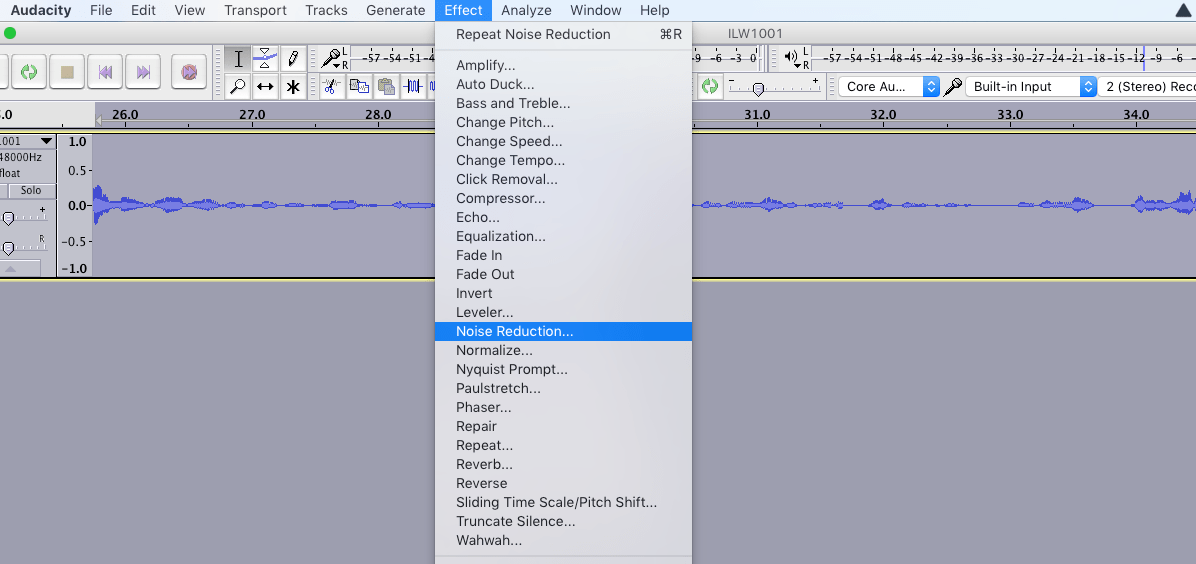
Once you have made your selection, open up the Noise Reduction filter and follow the on-screen prompts.
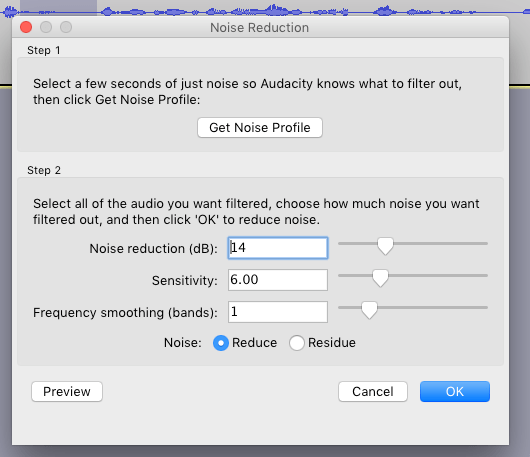
Step 1 asks you to select a few seconds of noise (I did this example with less then 1 second of noise but the longer the noise section the better).
Once the App has analyzed the noise, select all of the Audio and click Ok. The full file I did was over 4 hours long and the App did the quick clean-up in 5 mins.
If it is still not to your liking, adjust any of the three sliders until you get closer to the results you are looking for.
The following sample is the same clip after the noise reduction filter was applied. It is still not perfect but way more intelligible than before.
This last clip is how the recording sounded after I fixed the problem on site.
I hope this was helpful and shows the benefit of taking a few extra minutes to reduce unwanted noise in order that your message can be clearly heard.
As usual, please feel free to comment or contact me with any questions you would like addressed on this blog.

 Wide Q